 LinguaClip
Learn languages from the videos you actually watch
LinguaClip turns any video into line-by-line dictation, cloze and reading practice. Subtitles are generated on your own computer — nothing is uploaded.
macOS (Apple silicon & Intel) · Windows 10/11 · English, Spanish, French, German, JapaneseEverything a video can teach you
Drop in a video. LinguaClip makes the subtitles, splits them into short parts and turns them into practice.
Line-by-line dictation
Hear a line, type what you heard, see exactly which words you missed. Replay a single word, slow it down, move on when you are ready.

Watch mode
Watch with subtitles shown, blurred or hidden. Click any word to look it up, save lines you like, pause at the end of each line.

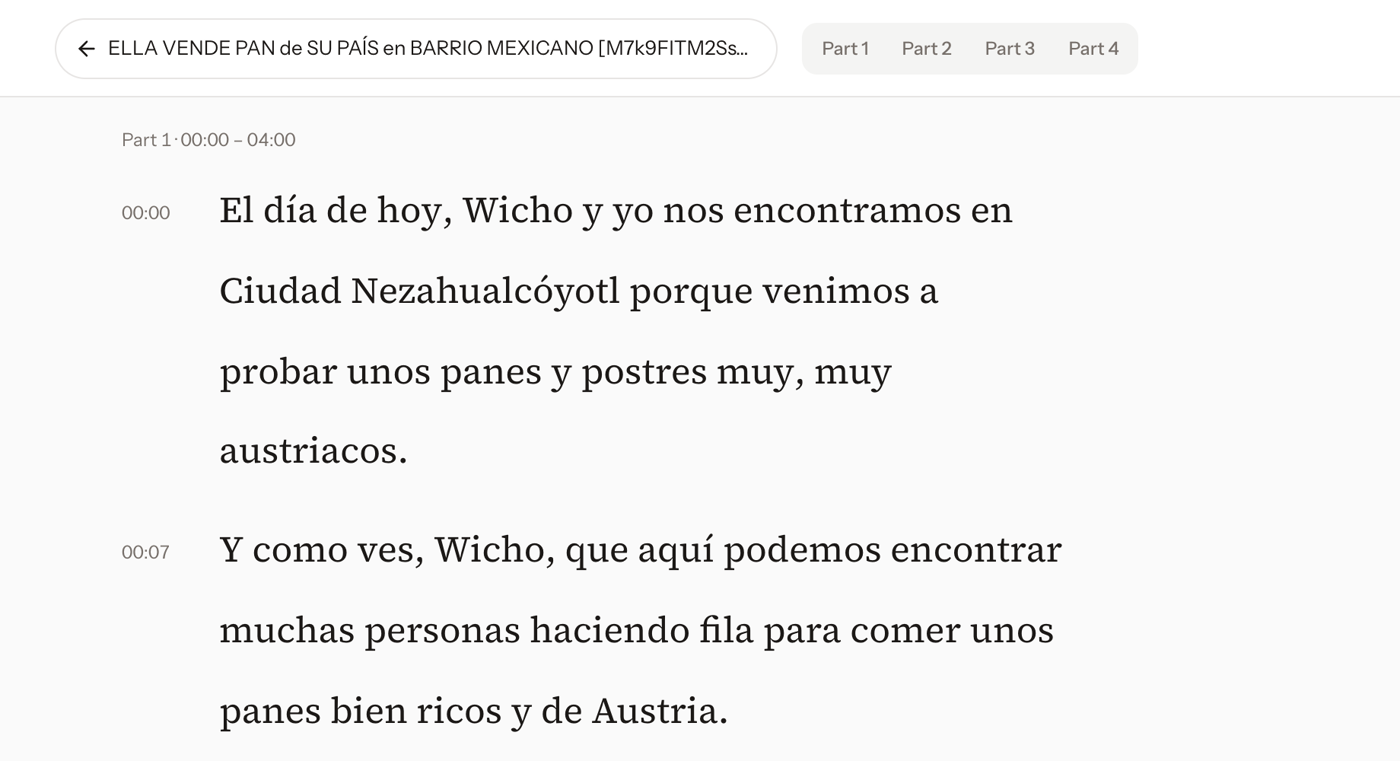
Read first Pro
Read the whole episode like an article before you watch: tap words to look them up, open a translation for any line, hear it in a small player. Words you looked up are marked when you watch.
Subtitles on your computer
Built-in Whisper speech recognition, offline after a one-time download. Or bring your own .srt.
Cloze & custom practice
Fill in the key words, or pick lines by level and time to fit a short session.
Review & Anki
Saved lines and words come back on a spaced-repetition schedule, with audio. Export to Anki in one click.
Pricing
The core app is free and open source. Pro is a one-time purchase — no subscription.
Free
Forever
- Auto subtitles on your computer
- Dictation, cloze, custom practice
- Watch mode, word lookup
- Review cards & Anki export
- Try Pro on 3 videos
Pro · lifetime
Early-bird price for the first 60 days or first 200 buyers. One-time payment.
- Everything in Free
- Read first: reader with lookup & translation
- Podcasts (coming soon)
- All future Pro features included
- Use on up to 3 computers
Questions
Is the free version really free?
Yes. The core app is open source under the AGPL-3.0 license, and every feature outside Pro works without a time limit.
Do my videos leave my computer?
No. Videos and subtitles stay on your computer. Only the things you choose to use talk to the internet: word lookups, an AI provider you configure yourself, or cloud transcription if you turn it on. See the Privacy Policy.
Do I need an AI subscription?
No. Dictation, watch mode and the reader work without AI. AI features (translations, levels, cloze) use an API key you enter in Settings, so you pay your provider directly and nothing is marked up.
Can I try Pro before buying?
Yes. Every copy can use the reader on 3 different videos for free, and those 3 stay readable afterwards.
How many computers can I use?
One Pro license activates on up to 3 of your computers. Deactivate an old one in Settings to move it to a new one.
Refunds?
You can get a full refund within 14 days as long as the license has not been activated. Please use the free trial to decide. Details in the Refund Policy.